Electronic Case Filing Information and Resources
The United States District Court, Eastern District of Michigan requires all admitted attorneys to electronically file documents in their cases using CM/ECF - NextGen. Information regarding rules, policies, manuals and frequently asked questions is found below. Parties representing themselves in an existing case that want to electronically file should fill out the Pro Se File Application for Electronic Filing form and submit it to the Clerk's Office.
Rule 6 (R6) of the Electronic Filing Policies and Procedures requires attorney filing users to make reference to the PageID when referring to a portion of the record that was previously filed. The Electronic Case Filing (ECF) system also allows reference to the record's document number, or ECF No. The ECF No. and PageID are located in the document header of all electronically filed documents.

When referencing a record by PageID, include the record's ECF No. using the following citation form:
| TO REFERENCE | CITATION EXAMPLE |
|---|---|
| A single page | ECF No. 10, PageID.234 |
| Multiple sequential pages | ECF No. 10, PageID.234-235 |
| Multiple pages not in succession | ECF No. 10, PageID.234, 238, 245 |
EXAMPLES:
- In its Order dated 1/3/2020, the Court directed the parties to submit supplemental briefs. (ECF No. 25, PageID.685.)
- In his Response, Defendant claims that no contract exists between the parties. (ECF No. 12, PageID.255-256.)
- Defendant admitted she was at the scene, which was also confirmed during the proceedings at the local district court. (ECF No. 18-3, PageID.302, 304, 308.)
When referencing a portion of a different case record within the Eastern District of Michigan, the 13-character case number for that other case must precede the citation (e.g., 2:19-cv-11222 ECF No. 15, PageID.280).
Following the proper citation form provides the reviewing judicial officer an electronic link to the document and specific page(s) of the record being referenced. Failing to properly cite the record may result in the filing being stricken from the record.
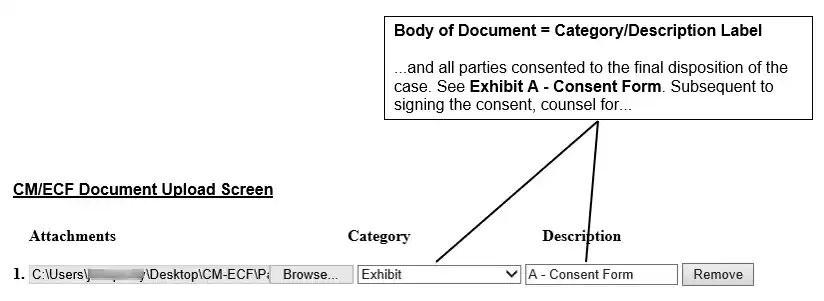
Attachments that are included with certain filings (e.g., an opening brief) will not yet have a PageID designation at the time of filing. Thus, to refer to an attachment that is being filed contemporaneously with a main document (e.g., an opening brief with an attached exhibit) and also provide an electronic link to the exhibit for the reviewing judicial officer, cite the attachment using the exact description for the attachment that is entered at the time of filing.